

Records, CDs, DVDs, books and instruments

It's 10 pm. Do you know where your albums are?

You care about your media collection. Flatty helps!

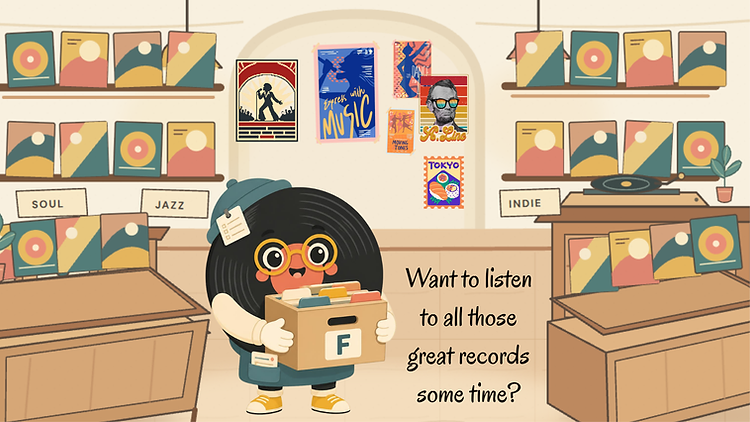
Flatty McBundler in his record shop, holding a pack marked F

who needs this

Who needs this?

  • People who have vinyl records
  • People with CDs, DVDs and books on the same shelf
  • People with a guitar or a keyboard in a case
  • People who like to listen to them
  • People who want to be able to get at them easily
  • If you're a DJ
  • If you're moving soon
  • Professional organizers
  • If you are into buying and selling
  • If every time you hear a song you feel compelled to post it to your social media
  • If you're hunting for samples
  • If you're making content
  • If you inherited a record collection and want to make sense of it
  • Anyone with records, CDs, DVDs, books or instruments who wants help using them.

What does this do?

A real recording of a record being added to Flatty: photographed, typed up and dropped into its box.

The pauses are me looking for the information on the record.

not just records

It works for anything you keep in a case.

Flatty was built by a record collector, but nothing in it assumes vinyl. A shelf of CDs, a wall of DVDs, a stack of books and a guitar in its case all file the same way: into a labelled pack, with a photo and a slot, findable in seconds. Add a video link and the whole shelf plays, not just the records.

  • Vinyl records

    LPs and 45s, singles and boxed sets

  • CDs

    Jewel cases, digipaks and multi-disc sets

  • DVDs and Blu-rays

    Films, series and concert discs

  • Books

    Paperbacks, hardbacks and boxed sets

  • Instruments

    Guitars, basses, keyboards and drum kits, cases and all

look inside

We're going to catalog that big pile of media and it won't be that hard.

We're going to type the stuff in. We're going to put it in a pack. We're going to write the location down. That's it!

Add media in a minute

Snap the cover with your webcam, type the details, and it saves as you go.

A map of your stars

Use Bundles to keep track of how you want to use your collection, and it will tell you where to find things.

Ask Flatty

I'm training an automaton to answer questions about record collections. Join me!

The designer who makes Flatty McBundler, standing by the water

Who makes this

A person is making this for you to help you with your lovely things collection.

Made by a long time app designer to catalog a real big pile of media. It's under active development and new features are coming all the time. We're going to get this done! I used AI to do the building, but the UX is 100% organic farm raised human!

A production of tara.city LLC

Pay what you want

Pay what you want, when you want.

No subscription, no upsell, nothing held back. Flatty is free to use and stays that way. If the app has saved you an evening of digging, chip in whatever feels right, whenever it feels right.

$
Create an account to pay

Paying needs an account, so the contribution is recorded to you. Signing up takes about a minute.

What the effort pays back

Big Effort + Big Help = Big Reward

Typing a whole collection in is the effort. Here is what comes back: a finish line you can keep to, and sheets that put the work to use.

Big Effort

Traditional or voice-assisted data entry: Your choice

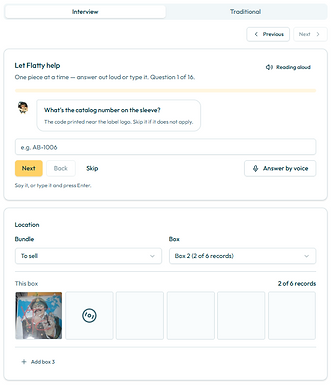
Type every detail into the form if you like to see the fields, or open Interview and let Flatty ask for one piece at a time: the catalog number, the artist, the title, the grade, then the rest. Answer out loud or type it, skip what does not apply, and check the lot over before it files. Whichever way you go, the front cover photo goes on first and the item lands in the same pack with the same number.

Send New Media to Discogs by Default

When you hook up your Discogs account, new media you add here will go there automatically. Easy to add here, easy to sell there.

The Add Record page with the Interview and Traditional tabs, Flatty asking for the catalog number one piece at a time

Big help

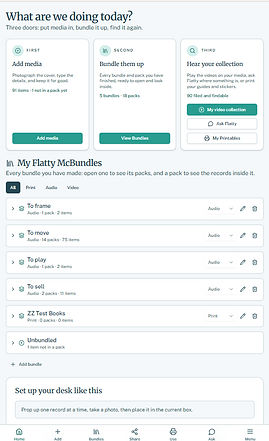
This is what the app looks like when you open it

When you open the app, Flatty helps you dive right in. Grab the first item you see and click "Add". Your collection will grow just by adding new media one at a time.

Inside the app

Inside the app, the navigation helps you add media, explore your collection, and participate in the community.

Do I need a record player?

No. We use the work other people have already done to put things on YouTube. You don't need a record player to organize your collection, and with Flatty McBundler you don't even need one to hear it.

The app's home screen: three doors to add a record, bundle them up or hear your collection, with the bundles you have made listed below

Set up your desk like this

Prop up one record at a time, take a photo, then place it in the current box.

  1. 1

    Stack of unscanned media

  2. 2

    Prop up current item in front of webcam

  3. 3

    Place in pack when done

Left to right: Get it → Scan it → Pack it

Big Effort

Flatty helps you see the finish line

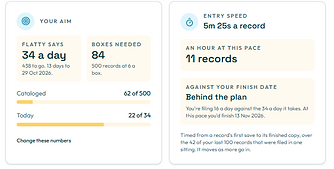
Get your whole project done by sticking to your goals. Tell Flatty how many media items you want to catalog, what date you want it done by, and how many items your packs hold. Flatty does the sums: what it takes each day, how many days are left, and how many packs the lot will need. It also keeps an eye on the pace you are going at, measured against the date you picked, so you can see whether you are on track and the day you would finish if you carried on as you are.

Your aim

Flatty says

14 a day

180 to go. 13 days to 29 Oct 2026.

Packs needed

84

500 items at 6 a pack.

Against your finish date

On track

You're filing 32 a day, and 14 a day gets you to 29 Oct 2026.

Cataloged320 of 500
Today14 of 14
The home screen with the aim card and the entry speed card side by side
Both cards on your home screen: the aim, and the pace you are going at against the date you picked.

Big reward

Hear your collection

The item you are typing in

ArtistCharlie Parker & Jazz Kings
TitleBirds with the herd
Catalog numberAL-1001
Charlie Parker & Jazz Kings Birds with the herd AL-1001 Search

YouTube URL

youtube.com/watch?v=Q3gK1s9rZ8oOn air

Type what the cover says, search, paste the link. The video stays with the item from then on.

A video for the whole album

You are already typing the artist and the title. One search while you are there and the item arrives with something to play.

Spinners Club

Vinyl Vic’s collection

19 items cataloged · 12 videos lined up

flattymcbundler.com/club/vinyl-vic

Birds with the herdOn air · Charlie Parker & Jazz Kings

Charlie Parker & Jazz Kings

Birds with the herd

1951 · Alamac · Shared by Vinyl Vic

XTC / The Dukes Of Stratosphear

25 O' Clock

Virgin · UK · Shared by Vinyl Vic

…and every other item on the shelf

A page that plays

Claim a club name and your media gets a page anyone can open. Every item with a video plays right there, with a link to post or text round.

You are prompted to listen to each record as you add it

Cataloging is the moment to grab the video of the whole album, and everything you need is already printed on the cover. Type the artist, the title and the catalog number, click search, and if a video of that album is out there it comes up. Paste the link in beside the record and it is done.

We do it this way on purpose. A webcam cannot read a cover: the print is small and these covers were never made to be machine readable, so a photo of the front gets you nowhere. A Discogs lookup is the other tempting shortcut, and APIs are finicky: they slow down, cut you off, and come back with the wrong pressing. Typing what your record actually says works every time.

Do that as you go and the work pays off twice. Every link you lined up turns your shelf into a playlist: a shareable collection page that plays, for anyone you hand the address to. Here’s mine:

The DJ CocktailsFor2 Collection

DJ CocktailsFor2 was a professional DJ, raconteur, layabout, intermittent dispomaniac, and prolific record collector. These are the records I'm using this software to add to my own records. If you do the same, you can get a neat little shareable page just like this.

Want your own?

Join now

The station is off the air for a moment. Refresh the page to try again.

Big reward

See your collection

You tell Flatty what you have once, and never have to do it again. Four sheets come out of it: the manifest by media, a manifest by pack, and stickers for your packs and your items. Print one at a time, or take the lot as one PDF for a library or a print shop.

Flatty McBundler

Manifest by media · printed for the shelf

Jazz

4 items

Charlie Parker & Jazz Kings

Birds with the herd (1951)To move, Pack 1, position 6

Chas Jenkel

Chas Jenkel (1980)To move, Pack 1, position 6
Questionnaire (1981)To move, Pack 1, position 7

Blues

1 item

Dave Mason

Alone Together (1970)Jazz keepers, Pack 3, position 2

…and every other genre in the collection

Manifest by media

Every item by genre and artist, with where each copy sits and its condition and tags.

To move

Manifest by pack · printed 15/10/2026

Closed1Assembled

Inside this pack

4 items

  • 1Birds with the herd (1951)Charlie Parker & Jazz Kings · Media VG+ · Jazz
  • 225 O' Clock (1985)XTC / The Dukes Of Stratosphear · Media NM · New wave, Promo
  • 3Questionnaire (1981)Chas Jenkel · Media VG+ · Rock
  • 4Alone Together (1970)Dave Mason · Media VG · Rock

Flatty McBundler · one sheet per pack

Manifest by pack

A sheet per pack: the bundle and pack number at the top, and every item filed inside it listed.

Bundle and pack stickers

Sized for 2⅝ × 1 inch labels

To move

Closed1Assembled

To move

Open2Filling

Jazz keepers

Stored3Labeled

Jazz keepers

Closed4Labeled

Stick one on the spine or the front of every pack.

Bundle and pack stickers

A sticker per pack: the bundle name in big letters and the pack number, for the spine or the front.

Media stickers

One per item · 2⅝ × 1 inch

Birds with the herd (1951)

Charlie Parker & Jazz Kings · Media VG+ · Jazz

To move, Pack 1, position 6

Mondo bongo (1980)

Boomtown Rats · Media VG+ · New wave, Promo

To move, Pack 2, position 4

Alone Together (1970)

Dave Mason · Media VG · Rock

Jazz keepers, Pack 3, position 2

Front cover, condition and tags, and the pack it belongs in.

Media stickers

A sticker per item: what it is, its condition and tags, and the pack it belongs in.

for djs and sample hunters

Save the good parts.

The timestamp table lets you save YouTube links with timestamps and notes to make notes of the good parts you want to work with.

These notes stay private.

Sample spots

  • 0:12Intro drums, two clean bars
  • 1:48Horn stab to loop
  • 3:07Vocal break, dry

One item, three things worth coming back to.

Big reward

Send your G.O.A.T.s to market.

All that typing does not have to stay here. Connect your Discogs account and every copy you file can go over to your Discogs collection: Flatty finds the edition that matches the cover, and sends it with the grade and notes you already gave. Where Discogs has no edition the copy fits, it is marked so you can see which few still need a hand.

It comes the other way too. Bring an existing Discogs collection in and the years of cataloguing you have already done arrive with it, ready to be filed into bundles and packs instead of typed a second time.

And it all comes back out: one download gives you a spreadsheet of every item, artist, title, year and the pack and slot each copy sits in. A backup, a printout for a move, or a file for any other program you already use.

flatty-mcbundler-records.csv

ArtistTitleYearWhere
Charlie Parker & Jazz KingsBirds with the herd1951Pack 1, position 6
XTC / The Dukes Of Stratosphear25 O' ClockPack 3, position 5
…and every other record in the catalog

A real collection, sent over from here to Discogs, folder and all.

This is mine

What about supplies

Flatty tells you how much of what you need.

Boxes, tape, stickers, paper and ink: the bits that turn a pile of media into something you can find again. Flatty works out how much you need for the collection you are cataloguing, keeps the count of what you already have, and shows what you are short of.

Flatty does not sell you the boxes either. It points you at the ones that fit a record, at the best prices we could find, and the link takes you straight to the shop that has them, so there is no hunting and nothing added to what you pay.

Flatty takes nothing from those links and the app stays free. Chip in a tip if it saved you the hunting.

Supplies

3 of 7 still to get

Boxes84 needed · 20 on hand
Sticker paper12 needed · 4 on hand
Packing tape6 needed · 6 on hand

You are not alone at

Flatty's Spinners Club

Flatty doesn't let anything go to waste. Every piece of media Flatty knows about, minus the personal details, is here.

The shelf is taking a break. Refresh the page in a moment to try again.

Your media can live here too.

Making a free account takes about a minute, and the first record takes about the same. Flatty keeps the pack and the slot for every one, so finding it again is a search instead of a dig.

Start your collection free

Already have an account? Sign in

Spinners Club

Flatty’s Spinners Club Blog

Short notes from the club: what is on the turntable, what turned up in a box, what the shelf taught you. Every member can post one and fix their own, and the keeper can take any of them down.

Got something to say?

Sign in to post a note of your own. Reading is open to everyone.

Sign in

Florida-Balm

Oct 21, 2026

Good morning Spinners! Today I'm leaving the R group behind and moving on to the E's. I had crudely sorted by record collection by artist a while back but now that I"m cataloging I"m going in random order so as not to bore myself! Let's go!

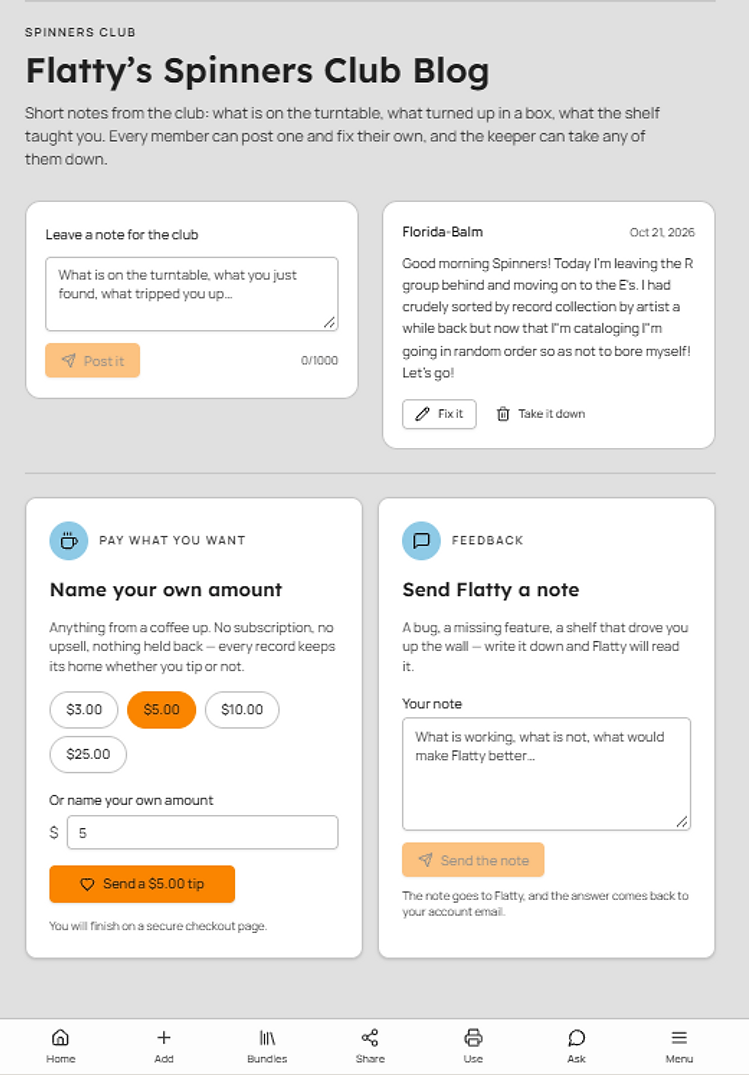
The club blog, the pay what you want tip box and the feedback form

the social club

Record Collectors Anonymous

The Spinners Club is anonymous on purpose. When you join you pick one club username, and that made-up name is the only thing the club ever sees of you. Post a note on the blog, climb the leaderboard, share your collection: it all appears under the name you chose and nothing else.

No real names, no email addresses, no photos of you, no record of what you were looking at. Pick a handle that sounds like a record collector and leave the rest of you at the door.

What if I don't like it?

I'm literally working on this app as I use it. Tell me what you don't like and we can see what we can do. You have an in with the CEO!

What the club sees: your username, your notes, and the media you have cataloged.

What it never sees: your name, your email, your address, or what you listen to in private.

and instruments

A guitar is not a record. Flatty knows that.

A record is asked for its artist and its catalog number. An instrument is not, so Flatty asks what kind of instrument it is first and then only the questions that fit it: a bass is not asked about its twelve strings, and an electric guitar is never asked whether it is electric. Guitars, basses, ukuleles, mandolins, banjos, keyboards and drum kits all file the same way the records do.

  • Maker and model

    Where a record has a label and a catalog number, an instrument has a maker and a model. That is the pair you search by.

  • Serial number

    Kept with the copy, so the one that came back from the shop and the one that did not can always be told apart.

  • Colour, strings, electric or acoustic

    Sunburst or natural, six strings or twelve, plugged in or not: what you would say out loud about it.

  • Photos of the parts that matter

    Front, back, headstock, serial, fretboard and case, each one its own picture rather than one shot of the whole thing.

  • Still a slot in a pack

    An instrument files into a pack like anything else, with a position, so you can walk straight to it.

  • And it can be heard

    Add a video link and the instrument takes its turn on your station, beside the records.